Release Summary 26.04 | Feb 19, 2026
The following key features and improvements, along with bug fixes, have been released in Algonomy DXP products in the release version 26.04.
Social Proof
Standalone Preview for Social Proof Message Design
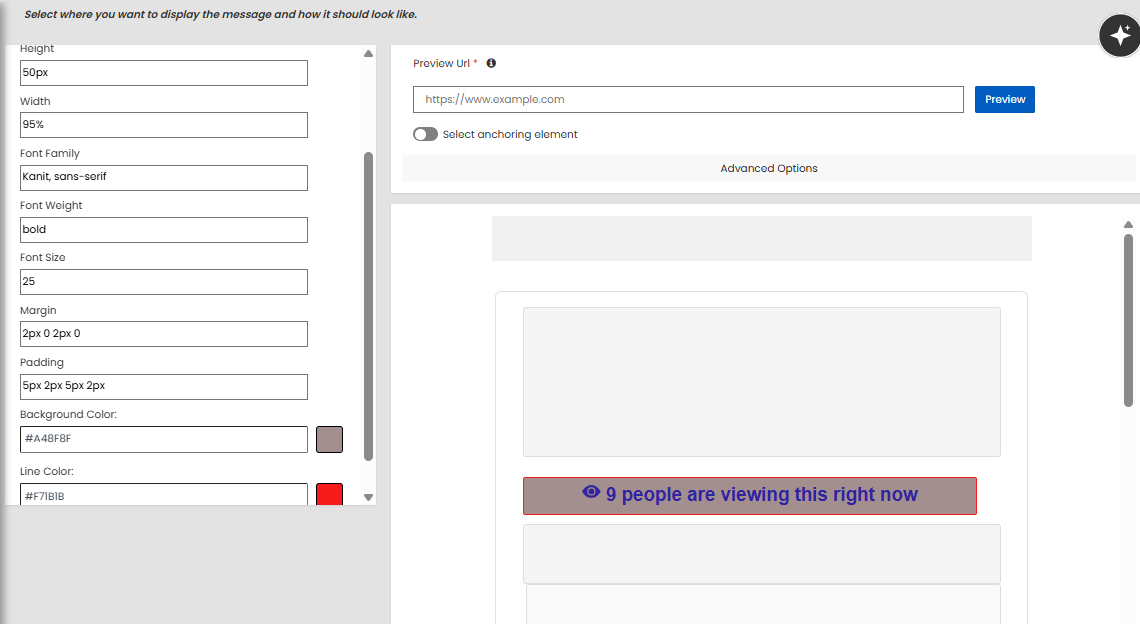
Social Proof now includes a built-in preview that allows users to visualize message design directly within the editor, without requiring a client website URL. The preview renders a self-contained representation of the message, reflecting the configured fonts, colors, borders, icons, layout, and text exactly as defined.
Design updates such as changes to text, font style, size, color, background, border, or alignment are reflected instantly in the preview area. By removing the dependency on live site embedding, this enhancement streamlines the design workflow and enables faster validation of message appearance before publishing.
Jira: ENG-31364
Social Proof MVT Support for Third-Party Traffic Assignment
Social Proof now supports passing MVT treatment assignments from third-party A/B testing tools for client-side integrations. This enables clients using platforms such as Optimizely to control traffic allocation externally while continuing to use built-in MVT reporting and analytics for measurement.
The mvt_ftr parameter can now be passed through r3_common and is supported in client.js implementations, consistent with existing behavior in p13n integrations. Support for R3_COMMON.setMVTForcedTreatment ensures the forced treatment is correctly reflected and transmitted to the relevant APIs, including Social Proof and Ensemble AI. This enhancement provides greater flexibility in experimentation while maintaining accurate reporting within the platform.
Jira: ENG-31696
Enterprise Dashboard
User Attributes Visibility in Test Drive
Test Drive now provides deeper user-level insights by displaying user attributes alongside segments when a user ID is entered. The existing User Segments tab has been renamed to User Info and includes a direct link to the user’s profile, which opens in a new browser tab for quick access.
Within the User Info view, segments and user attributes are displayed in separate sections. Attributes are shown as key-value pairs and include the combined set of batch and real-time user attributes. If no segments or attributes are available for the user, a clear message is displayed. This enhancement helps teams better understand how user data influences recommendations and content results during preview and validation.
Jira: ENG-31787
Display of Primary Category from Ancestor Hierarchy
The Product Catalog now correctly displays a product’s primary category even when it is defined at an ancestor level in the category hierarchy. If the primary category does not directly match an assigned category, the system checks the assigned categories’ ancestors and surfaces the appropriate primary category. This ensures that valid primary categories are always visible.
The Primary Category section now shows the full category path, including the direct category, with clear visual distinction. The primary category and root path are highlighted, and the category ID is displayed for the primary and leaf categories where applicable. The direct category is also removed from the general categories list to avoid duplication. This enhancement provides better clarity into category configuration and helps teams understand how category-driven recommendations will behave.
Jira: ENG-31789
Engage
Email Content Preview in Content Test Drive
Content Test Drive now supports previewing personalized content for email placements using the standard email image request flow. When an email placement is selected, the Email channel is automatically applied, with dedicated input fields for layout, campaign, and date. The date field is prefilled in a timestamp format with an auto-incrementing counter, making it easier to generate unique preview requests.
When the Email channel is selected, Test Drive calls the email image endpoint instead of the standard personalize API and displays the generated HTML code, including image and click requests, for validation. The request URL and rules view are hidden to align with email behavior. This enhancement enables teams to validate email proofs more accurately and streamline testing without leaving the Test Drive interface.
Jira: ENG-31550
Data Engineering
Enhanced Order Deduplication for Modified Orders
Order deduplication logic has been enhanced to better support scenarios where a single Order ID may be updated multiple times, such as in grocery use cases. When enabled through a new site-level configuration, the system now deduplicates based on Site ID, Currency, and Order ID, regardless of changes to total sales or number of units.
If multiple records for the same Order ID are received on the same day, only the latest version based on timestamp is processed, and all earlier versions are treated as duplicates. This ensures accurate order reporting, prevents inflated metrics caused by modified orders, and provides cleaner downstream data for analytics and performance measurement.
Jira: ENG-31594
Other Feature Enhancements
The following feature enhancements and upgrades have been made in the release version 26.04.
|
Jira # |
Module/Title |
Summary |
General Availability |
|---|---|---|---|
|
Find: Region-Aware Query Tag Handling in Search |
Query tag handling has been improved to prevent zero-result scenarios caused by region mismatches. Query tags are now stored with associated regions as a list, ensuring region-specific accuracy during search processing. The Search Service now selects query tags based on the requested region at query time. This enhancement improves search relevance and consistency across regions, especially in multi-region setups. |
19-Feb-26 |
|
|
Find: Configurable Tagged Filters for Query Understanding |
New configuration options have been introduced to provide greater control over Query Understanding filters. The enableTaggedFilters flag allows teams to control tagging and exclusion behavior for filters. By default, this flag is set to false. When enabled, tagged filter clauses are applied as part of the query, aligning with existing tagged filtering behavior. When disabled, filters are applied without tagging, ensuring that only filtered values are shown in the facet. Query Understanding filters also apply only when a facet contains a single tagged value. In addition, a new configuration setting, queryUnderstanding.tagging.enableFilters=true/false, has been introduced to completely enable or disable Query Understanding filters in Find requests. Setting queryUnderstanding.tagging.enableFilters=false disables Query Understanding filters in subsequent calls. This provides clients with more flexibility to manage filtering behavior based on their specific requirements. |
19-Feb-26 |
|
|
Find: Migration of Publisher Jobs to Airflow |
The WOC Aggregator, Global Ranking Publisher, and Related Searches publisher jobs have been migrated to Airflow for centralized orchestration and management. Required configuration updates were applied in Consul and Airflow variables, including container mappings, memory allocation, scheduling, and job chaining to ensure seamless execution. With this migration, these jobs are now managed through standardized Airflow workflows, improving operational consistency, visibility, and maintainability across environments. |
19-Feb-26 |
|
|
Find: Query Tag Index Updated to Respect Sitewide Filters |
Query tag generation has been enhanced to respect sitewide filters defined in the JSON configuration. When generating query tags, the system now applies these fixed filters to ensure that the resulting collections accurately reflect the intended catalog scope. In addition, the query tag collection is automatically recreated when catalog updates occur. This ensures the index stays aligned with the latest catalog state and maintains accurate search behavior over time. |
19-Feb-26 |
|
|
Enterprise Dashboard: Improvements to the New Configurable Strategies Page |
Several usability updates have been made to the new Configurable Strategies page. Tooltips now work on both click and hover, model type labels have been clarified, and the “Filters” panel has been renamed to “Advanced Settings” for better clarity. In addition, the “No Filters Applied” option is now selectable for all models, including User’s Activity models. These updates improve consistency and make strategy configuration more intuitive. |
19-Feb-26 |
|
|
Recommend: Automatic Resolution of Previously Unknown Products in Rules |
Rules that were created with products not yet present in the catalog are now automatically updated when those products become available. When Rec Restriction, Boosting, or Manual Recommendation rules are retrieved through the Dashboard API, any products that previously had null names are resolved against the current catalog. If the product now exists, its name is populated in the response instead of being shown as unknown. This ensures rules display accurate product information and behave as expected at runtime, without requiring manual updates from merchandisers. |
19-Feb-26 |
|
|
Chatbot: Configurable Number of Chatbot Response Carousels |
The chatbot UI now supports configuring the number of product carousels returned in a response. This allows teams, especially for mobile app experiences, to limit responses to a single carousel to keep conversations focused and reduce the likelihood of duplicate products appearing across multiple carousels. The system dynamically adjusts based on the number of examples defined in the LLM configuration. If only one example is configured, the chatbot generates a single carousel instead of multiple responses. This provides greater control over the conversational experience and improves clarity for shoppers. |
19-Feb-26 |
|
|
Enterprise Dashboard: Placement-Level Optimization Metric Configuration in Experience Optimizer |
Experience Optimizer now allows optimization metrics to be configured at the placement level within a page type. In addition to setting a metric for an entire page type, users can add placement-specific configurations and select a different optimization metric where needed. For example, a mobile app placement on the item page can use attributable conversion, while other item page placements continue to use click-through rate. Users can add and manage placement-level configurations directly under each page type, with validation to ensure the placement metric differs from the page type metric. This provides greater flexibility to fine-tune optimization strategies across channels and placements. |
19-Feb-26 |
|
|
Social Proof: Experience ID Included in Social Proof API Requests |
The Social Proof UI has been updated to append the Experience ID in spMessages API requests. This ensures that the correct experience context is passed as part of message retrieval and tracking. |
19-Feb-26 |
|
|
Platform: Datacenter-Based Configuration for Kafka Repeater |
Datacenter-Based Configuration for Kafka Repeater Kafka repeater configuration has been updated to use a datacenter-based approach instead of static region matching. Previously, regional filtering required manual configuration updates when datacenter-to-region mappings changed. The repeater now resolves its regional scope dynamically using centralized configuration, allowing updates to be applied in real time without service restarts. This improves operational efficiency and reduces configuration errors. |
19-Feb-26 |
|
|
Platform: Region and Datacenter Deletion Support in RapidConfig |
RapidConfig now supports deleting regions and datacenters through both the UI and API. Administrators can review impact details before deletion, including affected sites or assignments, and must confirm the action to proceed. All deletions include automatic cleanup of related references and are executed within database transactions to ensure data consistency. This provides safer and more controlled management of regions and datacenters. |
19-Feb-26 |
|
|
Enterprise Dashboard: Lowercase Normalization for Catalog Embedding Image Jobs |
Catalog embedding processing has been updated to normalize gender attribute values to lowercase during image job execution. For example, values such as “Male” are now converted to “male” before being stored or used in vector searches. This ensures consistent matching in the vector database and prevents mismatches caused by case differences, improving the accuracy of image-based search and recommendation results. |
19-Feb-26 |
|
|
Platform: Airflow Rollup for Streaming Enrichment Data |
An automated rollup process has been implemented to sync enrichment data from Postgres tables to the Enrichment API for streaming clients. This ensures that enrichment data created through the Portal or client feeds is consistently available for real-time consumption. Each rollup execution replaces the active dataset with the latest data from Postgres, handling dataset management, calculations, subscriptions, and ingestion as part of the process. This ensures streaming clients always receive up-to-date enrichment data without disruption. |
19-Feb-26 |
|
|
Data Engineering, Social Proof: Experience-Specific Evaluation in Social Proof Messaging API |
The Social Proof Messaging API has been enhanced to evaluate and return results only for specified experience IDs. A new parameter allows one or more experience IDs to be passed in the API request, ensuring that only relevant experiences are evaluated when thresholds and context conditions are met. Logging now records only the requested and eligible experiences, improving reporting accuracy for client-side integrations with optimization enabled. |
19-Feb-26 |
Bug and Support Fixes
The following issues have been fixed in the release version 26.04.
|
Jira # |
Module/Title |
Summary |
General Availability |
|---|---|---|---|
|
Data Engineering: Sanitization of Special Characters in Social Proof API Features |
We have fixed an issue where special characters such as spaces, colons, equals signs, or pipes within string features caused incorrect parsing in the Social Proof Optimization model and impacted downstream logging. String features in both context and action inputs are now sanitized before calling the Inference API and logging. Special characters within feature names or values are replaced with a standard alternative to ensure consistent parsing and prevent model corruption. |
19-Feb-26 |
|
|
Enterprise Dashboard: Placement Profile Chart Display for Single Currency Sites |
We have fixed an issue where the chart on the Placement Profile page was not displaying for single currency sites, even though data was available. The chart now loads correctly when the View Chart option is selected, ensuring accurate visualization of placement performance. |
19-Feb-26 |
|
|
Enterprise Dashboard: Error Handling for Relative Click and Product URLs |
We have fixed an issue where relative product URLs caused the UI to fail while constructing click URLs, resulting in an error message even when the chatbot returned a valid response. Defensive error handling has been added around the URL construction logic to safely handle relative paths. This prevents UI failures and ensures chatbot responses are displayed correctly. |
19-Feb-26 |
|
|
Science: Improved Handling of Empty Results in Chatbot Searches |
We have fixed an issue where the chatbot indicated that products were found but did not display any results to the user. The final response logic has been corrected to properly evaluate intermediate search results and clearly indicate when no products are found. Hard filtering has also been refined to prevent overly strict filters from excluding valid results. The search query now applies only approved hard-filter values, reducing false negatives and improving the overall search experience. |
19-Feb-26 |
|
|
Chatbot: Corrected Hard Filtering in Chatbot Search Results |
We have fixed an issue where hard filtering was not applied correctly in chatbot searches, resulting in unrelated products being returned. In certain cases, searches such as “grüne Schuhe” returned products that matched keywords in product names rather than the intended filter criteria. Hard filtering logic has been corrected to ensure that search results strictly adhere to the expected filter attributes. This improves result relevance and ensures users see products that accurately match their search intent. |
19-Feb-26 |